You Don't Need After Effects Templates to Make an Out Now Video
A vertical release-day video with your cover, your track and the streaming icons, made in the browser instead of After Effects.
Search for an "Out Now" video and most results point you to After Effects project files: a marketplace pack with a dozen comps, a list of plugins to install and a folder of placeholders to swap. Then you open the project, hunt for the right precomp, relink the fonts, replace the cover, trim the audio and wait for the render queue to finish.
That is a lot of machinery for a 15-second clip whose job is simple: show the artwork, play the best part of the song and tell people it is live on Spotify and Apple Music. The structure barely changes from one release to the next, only the cover, the names and the audio do.
visuale turns that structure into a template you fill in. Upload your cover and track, type the artist and title, pick the 15 seconds you want, and export a 1080 × 1920 MP4 that is rendered in the cloud. No project files, no plugins, nothing installed.
No After Effects, no plugins, no download.
After Effects template vs visuale
| After Effects template | visuale | |
|---|---|---|
| Software | After Effects installed, often plus third-party plugins | A web browser |
| Cost | Adobe subscription, often plus a paid template | Start free in the browser |
| Skills needed | Comps, precomps, keyframes and the render queue | Uploading a file and typing two names |
| Next release | Reopen the project and replace every placeholder | Swap the cover and audio, export again |
| Rendering | On your computer, which stays busy until done | In the cloud, you download the MP4 |
| Output | Whatever the template author set up | 1080 × 1920, 30 fps, 15 seconds |
What the Out Now Video looks like
Cover first, then the text
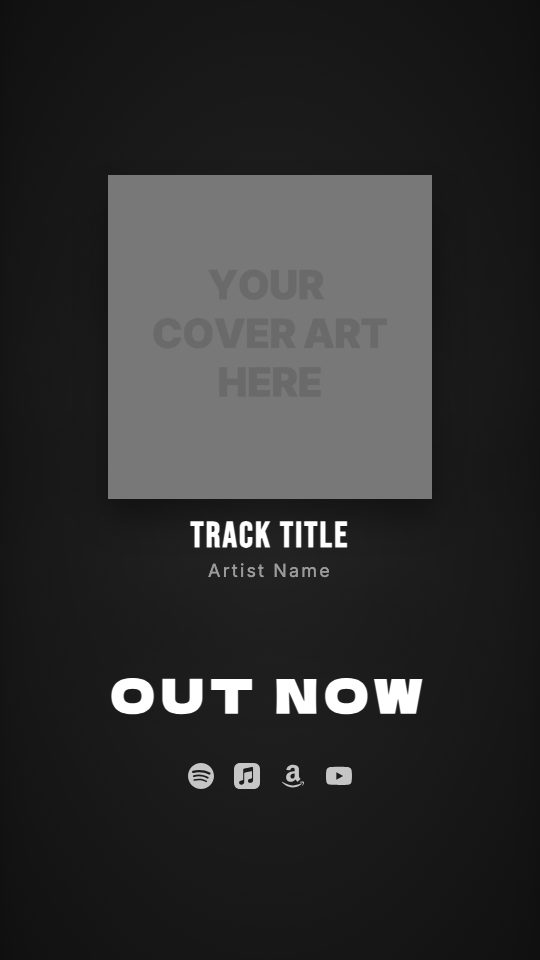
Your artwork animates in, followed by the track title and artist name in large type, so the release is readable within the first seconds.
An OUT NOW line you can rename
The headline reads OUT NOW by default. Change the text to something like "PRE-SAVE" or "NEW SINGLE", and pick how it enters: fade, slide, zoom, blur, bounce, stomp or shake.
Streaming platform icons
Spotify, Apple Music, Amazon Music, YouTube, SoundCloud and Tidal icons animate in at the bottom so viewers know where to listen. Show only the ones your song is on.
Background from your own artwork
By default the background is a blurred copy of your cover. Replace it with your own image or video clip, and add a dust, confetti or fire particle overlay.
Ready-made looks
Start from a preset such as CD Drop, Vinyl Release, Grunge or Crate Digger, each with its own cover style, motion and fonts, then adjust anything.
At a glance
- Format
- 9:16 · 1080 × 1920 px
- Best for
- Stories, Reels, TikTok
- Length
- 15 seconds
- Also available in
- Vertical only
- You need
- Cover art + audio (MP3, WAV, M4A or AAC)
- Software
- Your browser. No After Effects, no plugins
How to make an Out Now Video without After Effects
- 1
Open the Out Now template
Start the guided editor from this page. It walks you through the video in a few short steps, with a live preview on the side.
- 2
Add your cover and names
Upload the square artwork you sent to your distributor, then type the artist name and track title. Choose plain cover, vinyl or CD if you want the artwork on a record.
- 3
Upload the track and pick 15 seconds
Add an MP3, WAV, M4A or AAC file and drag the clip picker to the part you want. It marks where OUT NOW lands, so you can line the drop up with it.
- 4
Choose platforms and export
Turn on the streaming icons you need and export. The video renders in the cloud and you download a vertical MP4 ready for Reels, TikTok and Shorts.
When to use it
Release day posts
Post it to Reels, TikTok, Shorts and Stories the morning your single goes live, so every follower sees the same clear announcement.
Pre-save campaigns
Rename the headline to "PRE-SAVE" or "FRIDAY" and post it in the week before release, then switch it back to OUT NOW on the day.
Album focus tracks
Make one video per track from the same record. Only the audio, title and chosen 15 seconds change, the look stays consistent.
Labels with many releases
Add your label logo to the video and produce a release clip for each artist on the roster without opening an editing app.
FAQ
Is there a free Out Now After Effects template?
Some free project files exist, but you still need After Effects and an Adobe subscription to open and render them. visuale gives you the same kind of release video directly in the browser, with nothing to install.
What size is the video?
It is vertical 9:16 at 1080 × 1920 pixels, 30 frames per second and exactly 15 seconds long. That fits Instagram Reels, TikTok, YouTube Shorts and Stories.
Can I customise the text and fonts?
Yes. You can change the OUT NOW label, the fonts and sizes of each text line, and how the cover and headline animate in.
Which streaming services can I show?
Spotify, Apple Music, Amazon Music, YouTube, SoundCloud and Tidal. Turn on only the ones where your release is available.
Can I use my own background video?
Yes. The default background is your blurred cover, but you can upload an image or video clip instead and add a particle overlay on top.
Does the render use my computer?
No. The export is rendered in the cloud, so your machine stays free. When it is done, you download the MP4.
Skip the template download
Drop your cover, add your track and export your Out Now Video in about two minutes.
Make your Out Now Video