You Don't Need After Effects Templates to Make a Grunge Audio Visualizer Video
A battered sleeve, classic bars and a background that kicks with the drums, for music that should not look polished.
Grunge visualizer templates for After Effects tend to depend on a stack of third-party pieces: a texture pack for the distressed look, an audio spectrum effect or third-party plugin for the bars, and keyframes converted from audio amplitude to make the background react to the kick. Each piece is another thing to install, configure and keep working.
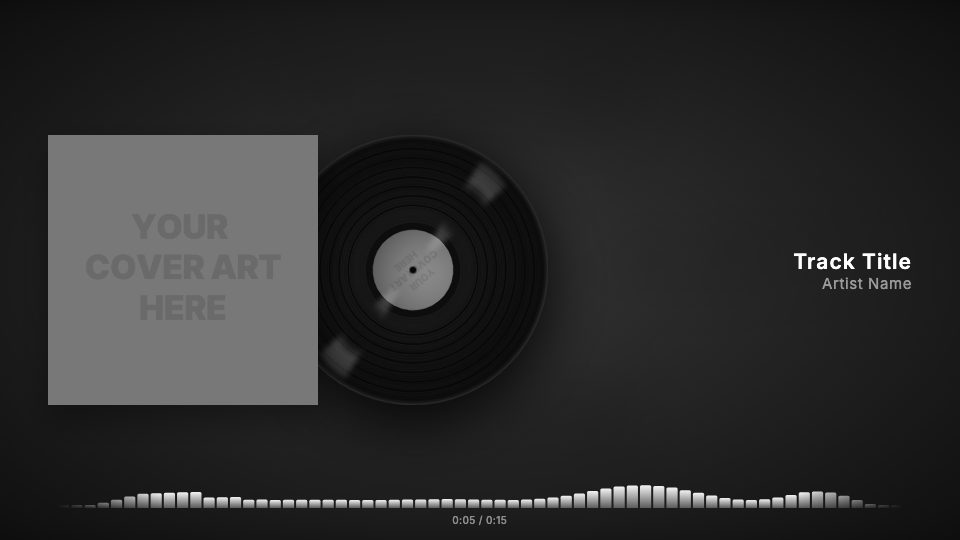
The Grunge Player look in visuale covers all three. A heavy wear texture is laid over your cover, solid bars react to the audio, and the background scales up on the kick drum so the whole frame moves with the beat. You do not wire anything to the audio; it reads the track you upload.
No After Effects, no plugins, no download.
After Effects template vs visuale
| After Effects template | visuale | |
|---|---|---|
| Distressed cover | Import a texture pack and blend it by hand | Wear texture over your cover at full strength |
| Reacting to the kick | Convert audio to keyframes, link scale with expressions | Background pumps on the kick automatically |
| Spectrum bars | Audio spectrum effect or a third-party plugin | Built-in bars driven by your track |
| Software | After Effects, often plus paid plugins | A browser, nothing to install |
| Rendering | Slow local render for the full song | Cloud render, then download the MP4 |
| Formats | One comp per aspect ratio | 16:9, 4:5 or 1:1 from one project |
What the Grunge Audio Visualizer Video looks like
Worn sleeve texture
A scuffed, worn overlay sits on the artwork at full opacity, so the cover looks like it has been through a few tours.
Background that pumps on the kick
The blurred background zooms in a little on each kick drum hit and settles back, so the frame breathes with the rhythm.
Classic spectrum bars
Solid vertical bars along the bottom jump with the audio, the most direct visualizer style for loud music.
Player layout with timer
Cover, track title and artist name are arranged for the chosen format, with an elapsed and total time counter under the bars.
At a glance
- Format
- 16:9 · 1920 × 1080 px
- Best for
- YouTube
- Length
- Follows your track
- Also available in
- 9:16, 4:5, 1:1
- You need
- Cover art + audio (MP3, WAV, M4A or AAC)
- Software
- Your browser. No After Effects, no plugins
How to make a Grunge Audio Visualizer Video without After Effects
- 1
Open Grunge Player
The editor starts with the wear texture, the beat background and bars switched on.
- 2
Drop in your files
Upload the cover art and the track. A clear kick drum gives the background the most movement.
- 3
Name the track
Enter the title and artist. Tweak the bar color, texture strength or beat amount if you want.
- 4
Export the video
Pick 16:9, 4:5 or 1:1, render in the cloud and download the MP4.
When to use it
Punk, rock and metal singles
A distressed cover and hard bars fit guitar music better than clean motion graphics.
Drum-heavy tracks
Songs with a strong kick get the most out of the pumping background.
Full-song YouTube uploads
Upload the whole track in 16:9 with constant movement on screen.
DIY and demo releases
Give a raw recording visuals that match its rough edges, without a design budget.
FAQ
Is there a free grunge audio visualizer After Effects template?
Free ones exist, but they need After Effects and often a paid plugin for the spectrum. visuale has the grunge look and the visualizer built in, free of plugins.
Can I customise the grunge look?
Yes. You can lower the wear texture or switch it to edges or creases, change the bar color or style, adjust the background, and pick other fonts.
What sizes does it export?
16:9 at 1920×1080, 4:5 at 1080×1350 and 1:1 at 1080×1080, at 30 fps.
How does the background follow the beat?
The track is analyzed for kick drum hits, and the background scales up briefly on each one. You can change how strong the effect is.
Can I use my own background image or video?
Yes. By default the background is your blurred cover, but you can upload your own image or video instead.
Skip the template download
Drop your cover, add your track and export your Grunge Audio Visualizer Video in about two minutes.
Make your Grunge Audio Visualizer Video