You Don't Need After Effects Templates to Make a Retro Music Player Video
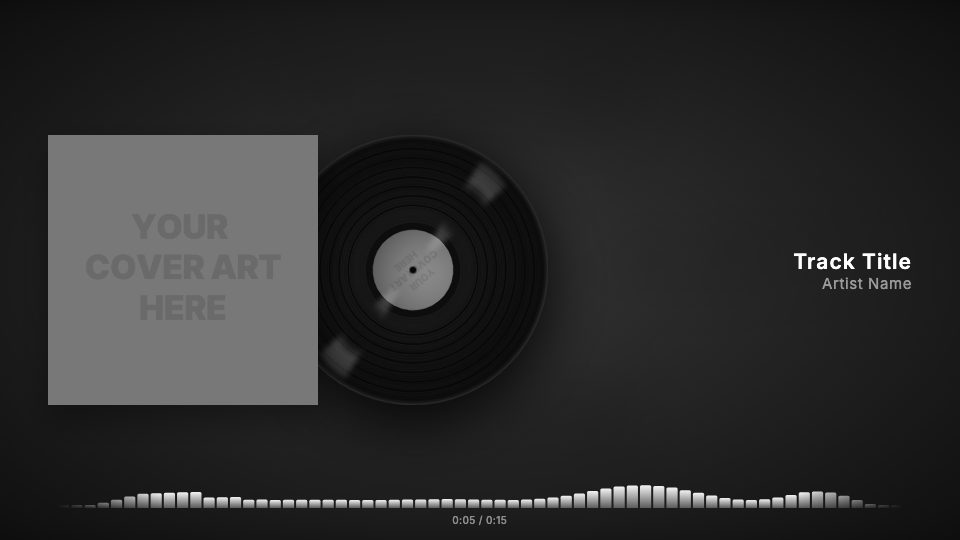
A worn, creased sleeve, a record sliding out to spin beside it and warm amber dots that pulse with the track.
Retro packs on template marketplaces lean heavily on texture: paper scans, film grain, scratches and a vinyl element you have to line up with your cover. Getting the sleeve to look handled rather than flat usually means stacking overlays and blend modes in After Effects until it feels right, then rendering the result for the whole song.
visuale gives you that aged look in one preset. A creased paper texture sits over your cover, a record slides out of the sleeve and keeps turning, the names are set in a tall condensed typeface, and an amber dotted visualizer moves along the bottom.
Because it is all built from your uploaded cover, every release can get the same treatment without reopening a project file.
No After Effects, no plugins, no download.
After Effects template vs visuale
| After Effects template | visuale | |
|---|---|---|
| Aged sleeve texture | Stack paper and crease overlays with blend modes | Crease texture applied over your cover |
| Vinyl coming out of the sleeve | Animate position and rotation keyframes by hand | Record slides out and spins automatically |
| Typography | Find, install and license a matching font | Condensed display font already set |
| Software | After Effects on a capable computer | Any modern web browser |
| Rendering | Full-length local render | Cloud render, MP4 download |
What the Retro Music Player Video looks like
Creased sleeve
A creased paper texture is laid over the artwork at 70% so the cover looks folded and handled, while the image stays clear.
Record slides out and spins
A vinyl record with your cover as its label slides out from behind the sleeve, then keeps rotating for the rest of the video.
Condensed type
Track title and artist name are set in Bebas Neue with wide letter spacing, a nod to old gig posters and record labels.
Amber dot visualizer
Instead of solid bars, rows of warm amber dots rise and fall with the audio.
At a glance
- Format
- 16:9 · 1920 × 1080 px
- Best for
- YouTube
- Length
- Follows your track
- Also available in
- 9:16, 4:5, 1:1
- You need
- Cover art + audio (MP3, WAV, M4A or AAC)
- Software
- Your browser. No After Effects, no plugins
How to make a Retro Music Player Video without After Effects
- 1
Open Retro Player
The editor loads with the crease texture, the sliding vinyl, the condensed font and amber dots.
- 2
Upload artwork and track
Add your cover, which is used for both the sleeve and the record label, and your audio file.
- 3
Enter the names
Type the track title and artist. Adjust the texture strength or dot color if you want.
- 4
Export
Render in the cloud and download your MP4 in 16:9, 4:5 or 1:1.
When to use it
Soul, funk and jazz releases
A worn sleeve and spinning record suit music with a vintage sound.
Reissues and old recordings
Give an archive track or remaster a look that matches its age.
Sample-based hip-hop
Producers who dig through records can match the visuals to the source material.
Vinyl pre-order posts
Show the record coming out of the sleeve while fans hear the track.
FAQ
Is there a free retro music player After Effects template?
You can find free retro projects, but they require After Effects and usually extra texture packs. In visuale the textures and vinyl animation are included in the preset.
Can I customise the retro look?
Yes. You can change the cover texture (wear, edges or creases) and its strength, the fonts, the visualizer style and color, and the background.
What aspect ratios are available?
16:9 at 1920×1080, 4:5 at 1080×1350 and 1:1 at 1080×1080. The layout adapts to each one.
Does the record use my artwork?
Yes. Your cover appears on the sleeve and as the label in the middle of the vinyl.
Can I use it for a full album track?
Yes. The video length follows your audio, up to five minutes.
Skip the template download
Drop your cover, add your track and export your Retro Music Player Video in about two minutes.
Make your Retro Music Player Video